Pastextra v1.0
Freeware
Vista / Win10 / Win7 / Win8 / WinXP
Vista / Win10 / Win7 / Win8 / WinXP
Pastextra allows you to paste text or images directly to files without having to use a third party application.
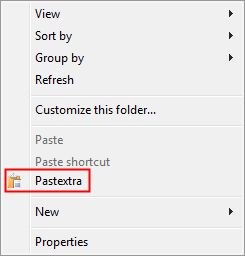
Once installed, it is available as a right-click option in Windows Explorer. Simply copy any text or image that you want to the clipboard as you would normally, then right-click and choose Pastextra and it will paste the data to a file (.txt or .png)
You can remove Pastextra from the Windows Explorer menu by running the installer again.
Once installed, it is available as a right-click option in Windows Explorer. Simply copy any text or image that you want to the clipboard as you would normally, then right-click and choose Pastextra and it will paste the data to a file (.txt or .png)
You can remove Pastextra from the Windows Explorer menu by running the installer again.
Screenshots:
HTML code for linking to this page:
Keywords:
pastextra
clipboard
paste to file
png
txt
License type
Freeware1
Author's homepage
Visit the author's site
Date added
01 Mar 2017
Downloads
157
File size
10.28 kB
(<1min @ 1Mbps)
Supported languages
English
Operating systems
Vista / Win10 / Win7 / Win8 / WinXP1
1License and operating system information is based on latest version of the software.
(No user ratings yet)