
PIXresizer v2.0.5
Freeware
Vista / Win2k / Win7 / Win98 / WinNT / WinXP
Vista / Win2k / Win7 / Win98 / WinNT / WinXP
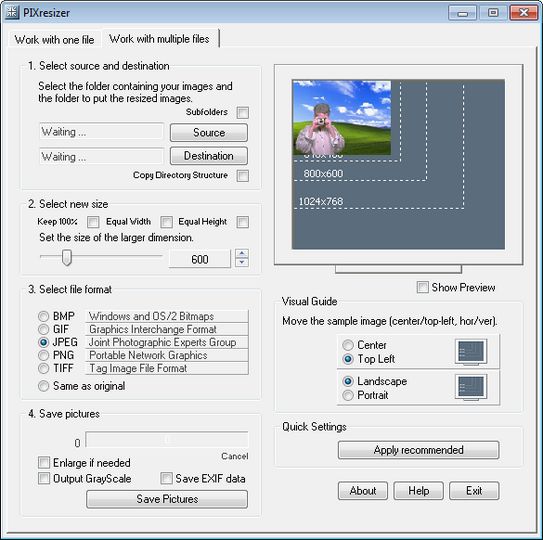
The reduced files are saved in a different folder, so your original images are not altered at all. PIXresizer offers several different resizing methods to choose from and can automatically recognize image sizes to calculate the best fit. In addition, it can convert between image formats (JPEG, GIF, BMP, PNG and TIFF), rotate images, convert to grayscale and resize multiple images in batch mode. It also allows you to keep the original EXIF information from your images. A great companion for webmasters and digital photographers.
Options/Features
Simple Four-Step Workflow
Easy 'Apply recommended' option to make it even more user friendly
Works with single files as well as with multiple files all at once
Option to convert between graphics formats (.bmp, .gif, .jpg, .png, and .tif)
Can be used to create thumbnails (takes one move on a slider)
Smart Ratio Calculation (image proportions can be overruled by the user)
EXIF support, JPEG compression, TIFF compression, DPI settings
Options/Features
Screenshots:

HTML code for linking to this page:
Keywords:
pixresizer
resize
convert
exif support
jpeg
tiff
compression
License type
Freeware1
Author's homepage
Visit the author's site
Date added
23 Jul 2014
Downloads
801
File size
3.28 MB
(<1min @ 1Mbps)
Operating systems
Vista / Win2k / Win7 / Win98 / WinNT / WinXP1
1License and operating system information is based on latest version of the software.
(No user ratings yet)

