
Disable Keyboard Buttons and Mouse Clicks Software v7.0
Commercial demo
Vista / Win7 / Win8 / WinXP
Vista / Win7 / Win8 / WinXP
Disable Keyboard Buttons and Mouse Clicks Software can block features of your keyboard and mouse.
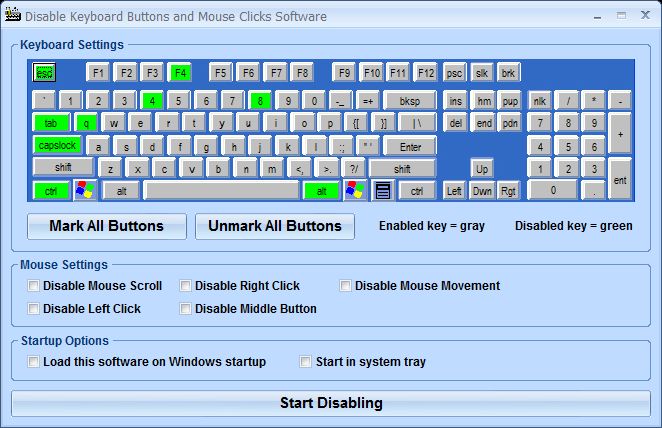
The user can select specific keys from the displayed keyboard or mark or unmark all keys at once. For the mouse, there are check boxes to disable: scroll, left click, right click, the middle button or movement (the cursor will not move).
You can set the software to load at start up.
The user can select specific keys from the displayed keyboard or mark or unmark all keys at once. For the mouse, there are check boxes to disable: scroll, left click, right click, the middle button or movement (the cursor will not move).
You can set the software to load at start up.
Screenshots:
HTML code for linking to this page:
Keywords:
disable keyboard buttons and mouse clicks software
block mouse clicks
block keys
License type
Commercial demo1
Author's homepage
Visit the author's site
Date added
21 Nov 2016
Downloads
152
File size
4.82 MB
(<1min @ 1Mbps)
Supported languages
English
Operating systems
Vista / Win7 / Win8 / WinXP1
1License and operating system information is based on latest version of the software.
(No user ratings yet)

