
Eusing Fast Folder Access v1.8.3
Freeware
Vista / Win7 / Win8 / WinXP
Vista / Win7 / Win8 / WinXP
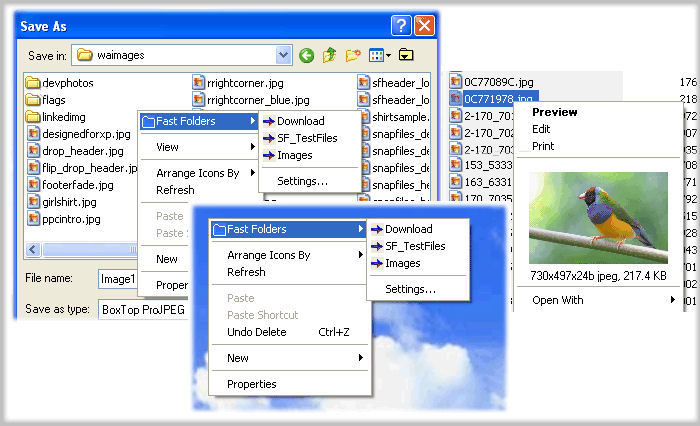
Eusing Fast Folder Access can give you quick access the "Fast Folders" menu by right-clicking in the common Open/Save dialogs.
You can quick access the "Fast Folders" menu by right-clicking in the File, Directory, Directory Background (right panel) of Windows Explorer.
Key Features:
You can quick access the "Fast Folders" menu by right-clicking in the File, Directory, Directory Background (right panel) of Windows Explorer.
Key Features:
- Fast access to folders in Open/Save dialogs.
- Fast access to folders in Windows Explorer.
- Fast access to folders on the desktop and the Start button.
- Easy to add folder to the list of "Fast Folders".
- Right-click on an image file in Windows Explorer to preview image and image file information.
- Add any file as shortcut to Quick Launch or create new folder to manage.
- Runs automatically as part of the Windows Explorer context menu.
Screenshots:
HTML code for linking to this page:
Keywords:
eusing fast folder access
folder
open/save
right click
License type
Freeware1
Author's homepage
Visit the author's site
Date added
04 Nov 2013
Downloads
249
File size
1.10 MB
(<1min @ 1Mbps)
Supported languages
English
Operating systems
Vista / Win7 / Win8 / WinXP1
1License and operating system information is based on latest version of the software.
(No user ratings yet)

