
DropboxSnip v0.2
Freeware
Win7 / Win8
Win7 / Win8
With DropboxSnip you can easily make screenshots from parts of your screen, save them directly to dropbox folder and create a public link to the saved image.
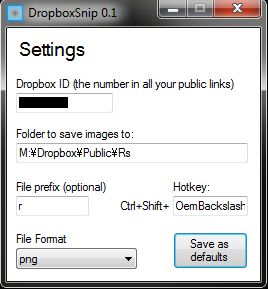
To get started with DropboxSnip, you must enter your Dropbox ID (the series of numbers in your public links) and define a folder to save the images to.
Use CTRL+SHIFT+3 to activate the capture mode and drag your mouse over the area you wish to capture with left mouse button pressen down. You can cancel the operation with right mouse button. After you have successfully made a screen capture the app will save the screenshot to the folder you defined and automatically creates a public link to the clipboard.
To get started with DropboxSnip, you must enter your Dropbox ID (the series of numbers in your public links) and define a folder to save the images to.
Use CTRL+SHIFT+3 to activate the capture mode and drag your mouse over the area you wish to capture with left mouse button pressen down. You can cancel the operation with right mouse button. After you have successfully made a screen capture the app will save the screenshot to the folder you defined and automatically creates a public link to the clipboard.
Screenshots:
HTML code for linking to this page:
Keywords:
dropbox
screenshot
screen
capture
public
link
automatic
License type
Freeware1
Author's homepage
Visit the author's site
Date added
30 May 2014
Downloads
215
File size
13.02 kB
(<1min @ 1Mbps)
Operating systems
Win7 / Win81
1License and operating system information is based on latest version of the software.
(No user ratings yet)

