
Microsoft Security Essentials for Windows XP/Vista/7 (64-bit) v4.3.216.0
Freeware
Vista / Win7 / WinXP
Vista / Win7 / WinXP
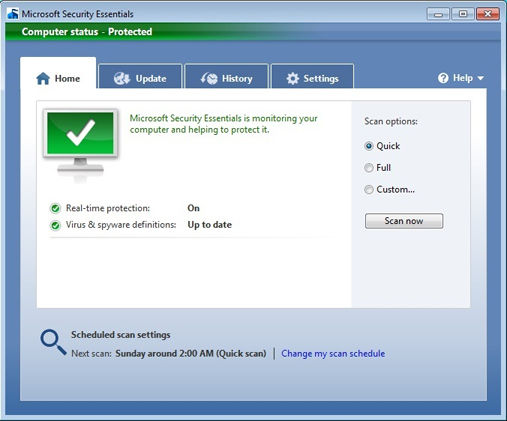
Microsoft Security Essentials provides real-time protection for your home PC that guards against viruses, spyware, and other malicious software. It is a free tool from Microsoft that is simple to install, easy to use, and always kept up to date so you can be assured your PC is protected by the latest technology. It?s easy to tell if your PC is secure when you?re green, you?re good. Microsoft Security Essentials runs quietly and efficiently in the background so that you are free to use your Windows-based PC the way you want, without interruptions or long computer wait times.
Screenshots:
Other editions:
HTML code for linking to this page:
Keywords:
microsoft security essentials
microsoft
security
essentials
antivirus
spyware
malware
License type
Freeware1
Author's homepage
Visit the author's site
Date added
11 Apr 2014
Downloads
909,219
File size
13.17 MB
(< 2min @ 1Mbps)
Operating systems
Vista / Win7 / WinXP1
1License and operating system information is based on latest version of the software.
11 Apr 2014Microsoft Security Essentials for Windows XP/Vista/7 (64-bit) v4.5.216.0(Latest stable version)
11 Nov 2013Microsoft Security Essentials for Windows XP/Vista/7 (64-bit) v4.4.304.0
05 Aug 2013Microsoft Security Essentials for Windows XP/Vista/7 (64-bit) v4.3.216.0
06 Mar 2013Microsoft Security Essentials for Windows XP/Vista/7 (64-bit) v4.2.223.1
14 Nov 2012Microsoft Security Essentials for Windows XP/Vista/7 (64-bit) v4.1.0522.0
25 Apr 2012Microsoft Security Essentials for Windows XP/Vista/7 (64-bit) v4.0.1526.0
04 Jul 2011Microsoft Security Essentials for Windows XP/Vista/7 (64-bit) v2.1.1116.0
20 Dec 2010Microsoft Security Essentials for Windows XP/Vista/7 (64-bit) v2.0.657.0
12 Oct 2010Microsoft Security Essentials for Windows XP/Vista/7 (64-bit) v1.0.2498.0
11 Aug 2010Microsoft Security Essentials for Windows XP/Vista/7 (64-bit) v1.0.1963.0
31 Mar 2010Microsoft Security Essentials for Windows XP/Vista/7 (64-bit) v1.0.1961.0
21 Feb 2010Microsoft Security Essentials for Windows XP/Vista/7 (64-bit) v1.0.1959.0
01 Nov 2009Microsoft Security Essentials for Windows XP/Vista/7 (64-bit) v1.0.1611.0


but for free virus protection is Microsoft Security Essentials # 2 Avast! Free Antivirus 5 is # 1
Installed finally by using IE...good so far, regular updates and caught one trojan a week ago which was easy to quarantine and remove...